PaperStream Capture (Pro / Pro Premium) 6.2 and PaperStream AI Updates
Faster document processing and more flexible data capture for streamlined business workflows
Version 6.2 of the PaperStream Capture Series software (PaperStream Capture Pro / PaperStream Capture Pro Premium) and the PaperStream AI(1) software for RICOH fi and SP Series image scanners are now available.
This update helps organizations streamline document-driven workflows by automating document intake, capturing data more flexibly, routing mixed document batches to the right destinations, and preparing extracted information for downstream systems. Together with improved PaperStream AI performance, the update helps users turn incoming documents into usable business data faster and with less manual effort.
Key Features
- Flexible data capture for diverse document formats
- Automated document intake from monitored folders
- Automatic routing for mixed document batches
- Business-ready data for downstream systems
- Enhanced PaperStream AI performance
- Faster Local AI-OCR for structured form processing
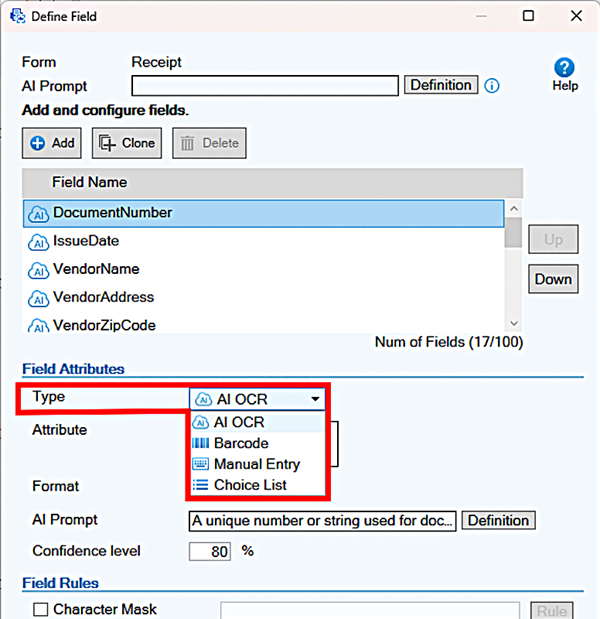
PaperStream Capture Pro and Pro Premium with PaperStream AI now enable users to select the most appropriate data-capture method for each field in semi-structured forms. In addition to AI OCR, users can capture data using Barcodes, Manual Entry, or Choice Lists.
For example, users can extract supplier names and invoice amounts with AI OCR, capture document IDs from barcodes, select internal codes from a predefined list, and manually enter information that is not printed on the document.
By using the right capture method for each type of information, organizations can reduce data-entry errors, improve consistency, and adapt workflows to documents that vary by supplier, country, or business process.
[Applies to: PaperStream Capture Pro/PaperStream Capture Pro Premium (Advanced Setup only)]
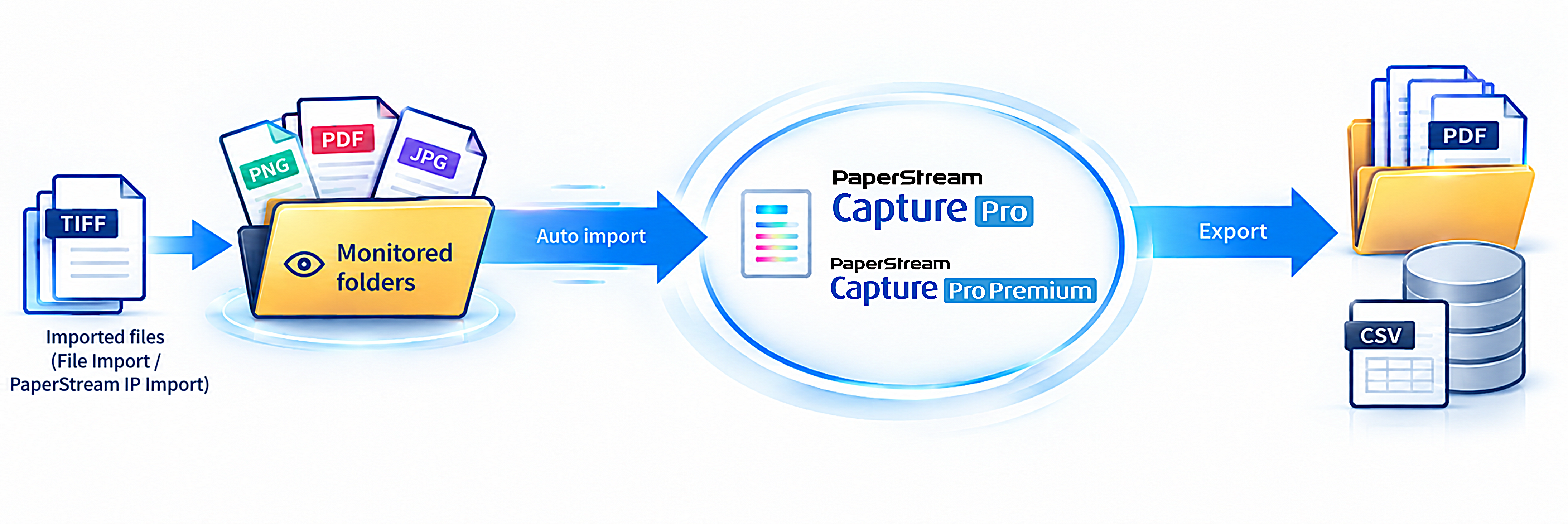
PaperStream Capture Pro and Pro Premium can now monitor designated folders and automatically import image files based on a predefined schedule. The feature supports File Import and PaperStream IP Import, and monitoring continues through a Windows service even when PaperStream Capture is not running.
This enables users to place documents from multifunction printers, shared folders, branch offices, or other systems into a designated folder and allow PaperStream Capture to import and process them automatically.
By reducing repetitive import operations, organizations can help prevent processing delays, minimize missed documents, and support scheduled or overnight document workflows.
[Applies to: PaperStream Capture Pro(2)/PaperStream Capture Pro Premium]
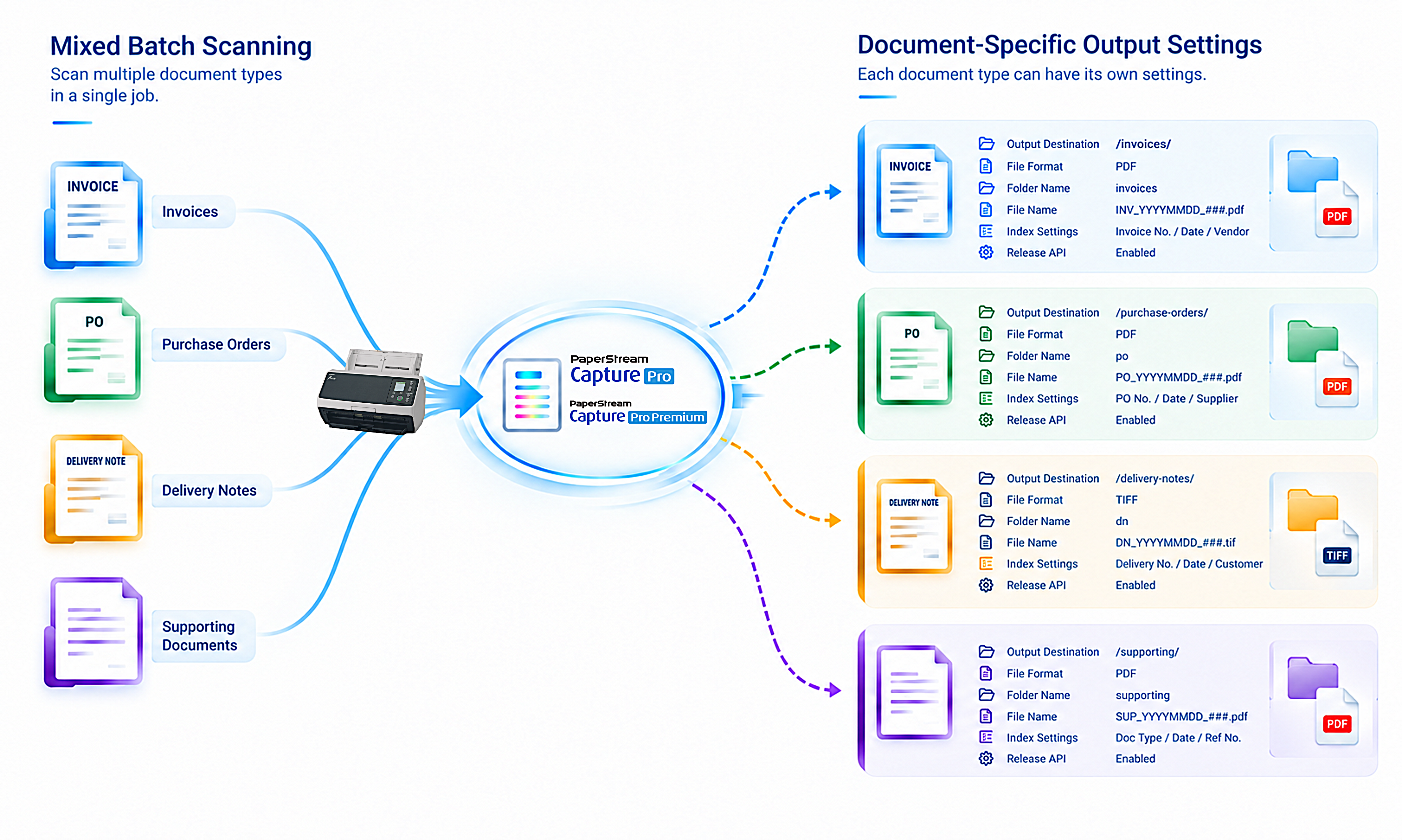
PaperStream Capture Pro and Pro Premium can recognize multiple document types within a single job and apply document-specific output settings. Users can configure different output destinations, file formats, folder names, file names, index settings, and Release API integration settings for each recognized document type.
This allows users to scan mixed batches—such as invoices, purchase orders, delivery notes, and supporting documents—without manually sorting them before or after scanning.
Each document can be automatically routed to the appropriate storage location, business system, or workflow, helping organizations simplify operations and standardize document handling across teams and locations.
*Examples of Destinations

[Applies to: PaperStream Capture Pro/PaperStream Capture Pro Premium (Advanced Setup only)]
PaperStream Capture Pro and Pro Premium can now process and transform recognized field values before exporting them. Users can apply rules such as text replacement, data extraction, prefix or suffix addition, padding, and date-format conversion. The transformed data can be exported in CSV, XML, or TXT formats.
This helps organizations prepare captured information in the format required by downstream systems, including ERP, accounting, document management, workflow automation, and RPA solutions.
Instead of manually reformatting extracted data or relying on separate conversion tools, users can create data that is ready for the following business process.
[Applies to: PaperStream Capture Pro/PaperStream Capture Pro Premium (Advanced Setup only)]
PaperStream AI improves processing performance for semi-structured documents, helping users complete document recognition and data extraction more quickly. Processing time for semi-structured English documents was reduced by up to approximately 40%(3).
The improvement helps users move more quickly from incoming documents to actionable business information, particularly during busy periods when document volumes increase.
[Applies to: PaperStream AI]
PaperStream Capture Pro AI-OCR 6.2 improves OCR processing speed by approximately 20–30%(4) compared with the previous version for supported languages, including English, Japanese, German, Spanish, French and Italian.
This helps teams process high volumes of business documents more efficiently, reducing the time between scanning, data extraction, review, and follow-up actions. It is especially valuable for organizations handling structured documents such as application forms, registration forms, and survey forms.
[Applies to: PaperStream Capture Pro/PaperStream Capture Pro Premium]
Notes
(1) Supported services and functions of PaperStream AI vary by country or region.
(2) Integration with PaperStream AI is required.
(3) Based on verification conducted by PFU using PFU-defined standard forms (printed text and handwritten) scanned at 300 dpi in full colour with PaperStream IP Import. AI-OCR processing time was measured from the start of recognition processing to completion by PaperStream AI. Tested with PaperStream Capture Pro / Pro Premium running simultaneously on 15 PCs. Average reduction in processing time per sheet vs. PaperStream AI 1.1.0, calculated using seconds per sheet.
(4) Based on verification conducted by PFU using PFU-defined standard forms (printed text and handwritten) scanned at 300 dpi in full colour with PaperStream IP Import. AI-OCR processing time was measured from the start of recognition processing to completion by PaperStream Capture Pro AI-OCR. Average reduction in processing time per sheet vs. the engine included in PaperStream Capture 6.1.0, calculated using seconds per sheet.
Trademarks
*PaperStream is a registered trademark of PFU Limited.
*Product names and company names are the registered trademarks or trademarks of the respective companies.
*The information contained in this press release is accurate as of the date of publication. Please understand that this information is subject to change without notice.