Real-world examples of how automation can unlock more efficient document creation and workflows
When it comes to modern business, every minute counts. That’s why so many are turning to digital processes to become more efficient.
Digital workflow automation can help you spend less time searching for data and more time getting work done. That means more effective case management, better access to information, and happier clients.
Here, we’ll walk through three critical areas in digital workflow automation to achieve your scalability goals. We’ll also explore real-world case studies featuring RICOH's technology partners.
Document creation: Making documents quickly and consistently
Many documents needed for everyday business use predictable layouts. Order forms, invoices, intake sheets, even contracts tend to have the same information in the same places every single time. These kinds of documents are great candidates for automation.
Using conditional templates would speed up the creation of these files. Conditional templates use a basic framework. Employees can enter data like names, prices, or dates, into required fields and the template then handles the rest. It puts this data into a pre-built document that only takes moments to generate. Some solutions use optical character recognition to make the process even faster. An employee simply scans the necessary documents and the relevant information is imported directly into the correct places on the form.
Case study: Sharp Healthcare® and Ricoh
Sharp Healthcare is a not-for-profit system of hospitals and medical groups serving a population of three million people in San Diego County. Like any healthcare organization, Sharp needs to capture a wealth of patient information — medical history, prescription information, insurance cards, and so on — and store it within its business and electronic medical records systems.
However, much of this information comes in the form of paper documents and physical cards. Sharp previously relied on a patchwork of scanner brands and models to digitize these documents, making it difficult to create a standardized process for ingesting information, especially as the organization grew.
Sharp partnered with Ricoh to replace its document scanning infrastructure with fi Series scanners. Thanks to Ricoh’s powerful integration capabilities, hundreds of fi scanners could now interface directly with Sharp’s content management system. When an employee scans a document, the image appears within the system and becomes available for use across the organization within moments. Thanks to the efficiency of fi Series scanners, Sharp Healthcare is able to process around 600,000 images every week and unlock nearly $150,000 in annual savings.
Document processing: Keeping the engine running smoothly
Organization and processing efficiency are critical roadblocks to success. A study conducted by Adobe® in 2023 found that nearly half of employees find that the organization systems their companies use are “not easy or effective to navigate.”
Process inconsistencies can create issues like duplicated documents or missed steps in workflow chains. These problems may cause employees to waste precious time fixing mistakes or waiting for next steps.
Document workflow automation systems ease many of these pain points. They automate case file processing, which moves documents through the chain of command. For example, employees may receive a document in their inbox. They would then process it and mark their task as completed. The next employee in the process then receives a notification that they are now ready to work on the file. By continuing this automated chain, documents no longer get stuck in limbo because everyone has full visibility into what they need to do and when they can do it.
These solutions also enable organizations to attach digital scans to files. This process ensures that employees have everything they need to complete a task. Organizations can then offer better service through more efficient and reliable workflows.
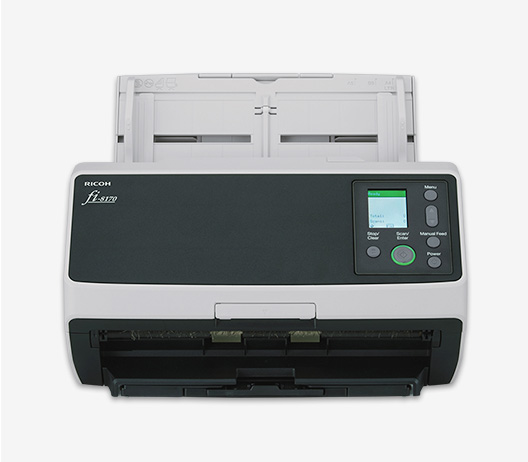
Did You Know?:TMC named the RICOH fi-8170 as a 2023 Future of Work Product of the Year. TMC recognizes "companies that showcase the most innovative and disruptive products and solutions that have positively supported hybrid work experiences across the globe." Click here to learn more.
Case study: New York Property Insurance Underwriting Association and Hyland®
Like many insurance agencies, the New York Property Insurance Underwriting Association (NYPIUA) deals with a large volume of paperwork. The business was already uploading these documents across both of its offices. But, it needed a way to automate the steps required to update and process claims for each of its clients.
NYPIUA chose Ricoh technology partner Hyland and its Alfresco® platform. Clients could submit claims through NYPIUA’s website, at which point folders with submitted documents would be automatically generated in its document management system.
This solution did more than automate document scanning and other processing tasks. It allowed employees to track many claims for each of its clients. By automatically attaching relevant details and documents to each case file, employees had everything they needed to process claims at every step. This tool unlocked levels of efficiency that NYPIUA would have never experienced otherwise.
Document approvals: Speeding up workflows and improving accountability
Document approvals are an integral part of achieving stakeholder buy-in and boosting accountability. They can also be a significant bottleneck in any organization’s workflow. One study found that 43% of people surveyed cited document approval requests as one of the top three processes most likely to be broken within their organization.
Automating the approval process can help reduce friction, if not remove it outright. Rather than waiting days for the mail to arrive, digital file delivery is instantaneous. It’s also available to every stakeholder, no matter where in the world they’re located.
Digital processes can also surface these approval requests when they’re ready. Digital workflow automation solutions will notify stakeholders through email when work is completed. They can then review the digital document, ask questions, or leave comments with built-in collaboration tools. And they can leave a digital signature on approved paperwork with real, legal backing.
These platforms also maintain a record of any approvals stakeholders provide. That way, there’s no second-guessing whether a project has been completed. The best part: All of these steps surface automatically whenever the previous task is finished. That helps you streamline approval flows, keeping them moving forward more efficiently than manual processes.
Case study: Business Finland and M-Files®
Business Finland is a government organization dedicated to fostering corporate growth. Its goal is to help businesses in the Scandinavian country enter the global marketplace. It wanted a full view of its entire document process chain, so Business Finland leveraged Ricoh technology partner M-Files.
When organizations come to Business Finland to apply for funding, they can submit their financial documents online. These documents go into M-Files, where specialists can process and approve their application. Both the customer and Business Finland can then see the approval chain online, turning a long, complicated, and largely invisible process into something that can be easily organized and tracked. Business Finland also utilizes M-Files document management for procurement workflows and HR work agreement organization.
M-Files is also compatible with various integrations such as Word, Excel, PowerPoint, Teams, and Outlook, helping organizations like Business Finland keep track of document data across a variety of applications and disciplines.
RICOH can help your organization scale smarter
If your organization wants to keep up with an increasingly competitive marketplace, it must embrace automation. However, knowing where to start requires a unique perspective and expertise.
RICOH can be that expert for you. We’ve spent years helping organizations of all sizes scale up their document workflow processes to unlock new efficiencies while remaining adaptive to ever-changing market conditions. We can also connect your organization to one of our third-party tech partners to make your automation journey as smooth as possible.
Want to learn how RICOH can help integrate document workflow automation throughout your organization? Contact one of our experts today, and we’ll find a solution that meets your needs.
Note: Information and external links are provided for your convenience and for educational purposes only, and shall not be construed, or relied upon, as legal or financial advice. PFU America, Inc. makes no representations about the contents, features, or specifications on such third-party sites, software, and/or offerings (collectively “Third-Party Offerings”) and shall not be responsible for any loss or damage that may arise from your use of such Third-Party Offerings. Please consult with a licensed professional regarding your specific situation as regulations may be subject to change.