Learn what performance characteristics to look for when shopping for independently operable scanning hardware.
Successful knowledge workers rely on the ability to stay agile and reduce roadblocks. That's why imaging solutions that can operate independently and securely are in high demand. They allow users to streamline their operations and keep information flowing. Plus they can affect greater change where it matters most.
But knowing which device is right for your needs can be challenging. As organizations mature, they often develop strict rules around how information is shared. This can make choosing a networked imaging device a daunting task. Thankfully, there are a few simple questions professionals can answer to help them narrow down their search. It all starts with understanding exactly what a network document scanner is and the benefits it can provide.
Check out our guide, Document Scanners: Everything You Need to Go Digital, for even more expert advice and information.

What is a network document scanner?
Network document scanners are PC-less digital document imaging device. It contains built-in support for data transmission to other devices on its network. Networked scanners offer the convenience of being able to send files directly from the scanner itself to an endpoint. This makes them different from non-networked document scanners. Those typically act as peripherals that need to be connected to another device, typically a PC, in order to store and send images. Common destinations include on-premises data servers, cloud storage services like Google Drive or SharePoint, personal computing devices, mobile phones/tablets, and more.
As of 2023 approximately 60% of all corporate data is now being stored in the cloud. As a result, many devices have evolved to support transmission to the most popular cloud based storage services. These include Dropbox, Microsoft OneDrive, or Google Drive. Support for more specialized cloud storage services like Hubdoc or Rocket Matter may be less common. This could require more involved integrations, so buyers should be sure to do their research before making a purchase.
What are the benefits of a network document scanner?
1. Shared Access, Lower Costs
Rather than purchasing and maintaining a scanner for every workstation, a single network scanner can serve an entire department or office. This reduces hardware costs, simplifies IT management, and frees up desk space.
2. Scan Directly to Where You Need It
Network scanners let users send documents straight to network folders, email addresses, or cloud storage without routing through a computer first. This cuts out unnecessary steps and gets documents into the right hands faster.
3. Streamlined Workflows
With documents going directly to their destination, teams spend less time managing files manually—no more scanning to a local drive, then uploading or emailing separately. It's a more direct path from paper to digital.
4. Consistent Document Quality
Many network scanners apply image processing automatically, so documents come out clean, straight, and properly cropped regardless of who's using the device or how the original was fed in.
5. Searchable, Usable Documents
OCR capability means scanned documents aren't just static images—the text they contain becomes searchable and editable, ready for immediate use.
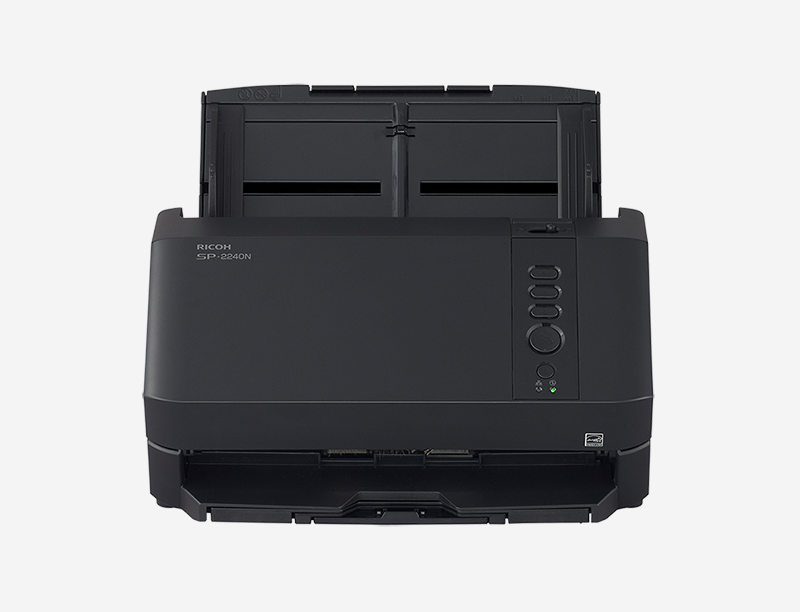
These benefits are exactly why we built DirectScan into our latest network scanner, the SP-2240N (shown below), giving shared offices a fast, flexible way to scan directly over the network to multiple destinations—with searchable output built right in.
With DirectScan and the SP-2240N, users can take advantage of three configurable destination buttons right on the front panel, sending scans to network folders, FTP/SFTP servers, or email addresses with a single press. This makes the SP-2240N a great fit for shared-use environments like front desks, copy rooms, or departmental hubs, where having a dedicated scanner at every desk simply isn't practical.
Understanding your network document scanning needs
The first step in choosing a network document scanner is to understand what your most common use cases will be and what performance characteristics will offer you the biggest return on your investment. Before making a purchase, ask yourself the following questions:
- How will the device be connected to other devices on the network, and does it include support for that medium? (2.4 Ghz Wi-Fi, 5 Ghz Wi-Fi, or Ethernet?)
- How frequently will the device be used, and will the resulting network traffic necessitate additional Wi-FI nodes?
- Are there any existing business systems/platforms that the device will need to support/integrate with?
- Where will the device be placed, and how much space is available?
- Will the device be accessible by members of the public and therefore need to be intuitive to use?
- Will the device be used to scan sensitive documents like medical or financial records, and therefore require additional security?
Knowing the answers to these questions will help you evaluate your options when it comes time to make a decision. Read on to learn more about the specifics of what to look for in each category.
What to look for in a network document scanner
Any networked imaging device should offer completely independent operability, and not strictly require that it be connected to an external machine, to allow multiple users within the same work environment. The primary benefit of a network document scanner is the ability to uncouple scanning functionality from a dedicated machine and unlock greater productivity for workforces. Be sure that any device you’re considering for its network support features is in fact a standalone device.
2. Convenient placement options
One of the biggest advantages of a networked document imaging device is the number of placement options that come with not being tied to network cables. With average office rents in major cities hovering around $40 per square foot, investing in equipment that can be placed anywhere can pay long-term dividends for business owners while accelerating workflows and cutting down on the overhead costs that come with having to ship physical documents.
Having a shared device capable of operating independently of other operating systems should, when executed correctly, minimize the amount of time IT resources need to spend maintaining it. Ensure streamlined support for drivers and support for the full gamut of data transmission technologies to ensure no special affordances are necessary. Make sure it can handle both 2.4 GHz and 5 GHz Wifi, as well as wired connection options. Having an ethernet document scanner or one that also supports USB can be helpful in a pinch.
4. Compatibility and compliance
Many businesses, especially those that have been in operation for a number of years, have likely made infrastructural investments that could be heavily tied to specific technologies, vendors, or protocols. Be sure to research whether or not any potential purchase can support systems that your business may be dependent on like TWAIN or the Image and Scanner Interface Specification (ISIS). If you’re doing archival work, your device may need to be FADGI capable to ensure alignment with any applicable federal guidelines.
Any dedicated imaging device should offer a clear and intuitive experience especially in environments where members of the public are interacting with it. If you’re considering a network document scanner for your customer-facing retail or commercial spaces, pay extra attention to size and usability of interfaces to avoid frustration and provide a smooth buyer’s journey.
2021 saw the average cost of a data security breach climb to $4.24 million. All businesses, regardless of size, need to be disciplined in their infosec practices, especially when it comes to sensitive documentation. Be sure any device you’re considering supports multiple security layers, including user-specific PINs, NFC card scanning, and authentication via digital credentials.
Even businesses fortunate enough to have dedicated in-house IT resources can often benefit from the help of a device manufacturer, especially when network technology is involved. Research what level of support is included in the purchase of a device and determine whether or not it’s worth investing in an extended support plan.
Our recommendation: Ricoh network document scanners
Ricoh network document scanners are capable of scanning from anywhere, to anywhere, without needing to be tied to an external device. With DirectScan, you can easily integrate with multiple on-premises or cloud destinations and transmit your images wirelessly anywhere in the world at the push of a button.
Our latest network scanner, the SP-2240N, is capable of scanning 40 pages per minute to three pre-programmed destinations using dedicated buttons. Ricoh network scanners, like the SP-2240N, are the ideal choice for anyone looking to add a network document scanner to their professional or retail environment.
Click here to learn more and to shop the full line of Ricoh scanners.
Note: Information and external links are provided for your convenience and for educational purposes only, and shall not be construed, or relied upon, as legal, financial, or technical advice. PFU America, Inc. makes no representations about the contents, features, or specifications on such third-party sites, software, and/or offerings (collectively “Third-Party Offerings”) and shall not be responsible for any loss or damage that may arise from your use of such Third-Party Offerings. Please consult with a licensed professional regarding your specific situation as regulations may be subject to change.