To Handle Documents Safely, Your Business Needs the Right Mix of Tools, Policies, and Employee Education
Whether your organization works with protected health information, financial data, or customer addresses, it's up to you to keep that data safe. If you don't, it can cost you. IBM's Cost of a Data Breach Report 2026 puts the global average cost of a data breach at $4.99 million. That is a 12% increase over the prior year and a record high.
You'll need a mix of thoughtful policy and sophisticated security solutions to protect your business from the widest array of threats. These best practices can help you design and implement secure document management systems that protect data and reduce your exposure to threats.
Want to learn more about document security? Read our guide, Document Security: A Guide for Modern Businesses.
Key Takeaways
- Secure document management starts at capture. Scanning paper straight into a protected system can help close gaps that email and shared drives leave open.
- Label documents by sensitivity and encrypt them at rest and in transit so the most sensitive files get the strongest protection.
- Grant only the access each role needs, require multi-factor authentication, and review permissions when people change roles.
- Share files through controlled links instead of email attachments, and follow a written retention and backup schedule.
- Regular audits and ongoing training help keep your policies working as threats and regulations change.
What Is Secure Document Management?
Secure document management is the set of policies, tools, and daily habits that control how documents are captured, stored, accessed, shared, kept, and disposed of. Its goal is to help make sure only the right people can see the right information.
It applies to paper and digital files alike, across the full life of a document. A document management system can handle much of the technical side, but the people and processes around it matter just as much. The eight practices below follow that lifecycle, from the moment a page is scanned to the day a record is securely destroyed.
Best Practices for Secure Document Management
1. Go Digital
The first step in securing your documents is to digitize them. In physical form, sensitive documents should be kept under lock and key. Access often has to be monitored and approved by hand. Not only does this slow down work, but it exposes your business to needless risk. Floods and fires can destroy thousands of records, and even a single misplaced file can lead to a major data leakage.
By digitizing paperwork, you can avoid these bottlenecks, keep documents neatly filed, and protect against natural disasters. At the same time, you gain a slew of new protective measures you can apply to keep threat actors out of your systems, from encryption to access controls.
The scanning step is a good place to start building that protection. We recommend scanning directly into your document management system or a protected folder rather than to email or a shared drive, where copies tend to linger.
Naming and indexing files at the moment of capture also helps your classification and access rules apply right away. If regulations require you to keep certain paper originals, store them securely and use the digital copy for everyday work.
2. Sort Documents by Sensitivity
Security features don't have to come at the expense of convenience. Sensitivity labels allow for secure document management that doesn't slow productivity. When a document enters your system, you can assign it a sensitivity rating depending on what kind of information it includes. That rating would correspond to the level of permissions required to access it.
For instance, you might use a document access control to ensure only personnel with a legitimate business need can view your most sensitive documents. That reduces your exposure in the event of a breach. Meanwhile, you could apply fewer restrictions to less sensitive documents. Applied with care, these controls protect data without leaving employees waiting for access to the documents they need.
3. Encrypt Sensitive Data
Encryption forms the foundation of secure document management, and you'll find it in plenty of security standards. For instance, the HIPAA Security Rule treats encryption of electronic protected health information (ePHI) as an addressable safeguard, making it a best practice if you work in healthcare.
When you apply strong encryption to a document, it becomes very difficult for a threat actor to read without the decryption key. If attackers do get into your systems, encrypted files are much harder for them to use. To get the maximum benefit, you should ensure documents are encrypted both at rest in storage and in transit whenever they're shared. For a closer look at methods and standards, see our post on document encryption.
4. Adopt a Document Management System
A document management system (DMS) is a software solution that organizes, tags, indexes, and stores documents in a single, centralized location. Not only is it incredibly useful for collaboration and organization, but it’s the easiest way to apply a wide range of secure document management tools at once.
That’s a boon for your employees, who now only need to learn one system rather than several. Storing your documents in a single system also makes it easier to apply protections consistently.
When selecting a DMS, look for these features to ensure a high-security product:
- Document access controls to specify which users can access which documents. Role-based permissions can speed up the process, and granular control over who can view or edit files makes for more precise security.
- Automatic document encryption to protect information as soon as it enters your system and prevent it from falling through the cracks.
- Audit trails and change logs to keep track of who changes files, when, and how. This maintains accountability, aids in forensic investigations, and helps compliance auditors work more quickly.
- Version control to preserve every iteration of a document. This allows you to roll back unwanted changes and prevents users from working on outdated file versions.
- Cloud-stored backups to protect your system from ransomware attacks. By restoring your system to an earlier version, you can cut your attackers’ leverage and return to work more quickly.
Most document management systems can be used in any sector. However, if you work in healthcare, law, or accounting, look for a DMS designed with your industry regulations in mind.
5. Set Document Access Policies
Having the right security tools is only half the battle. The other half is using them correctly. For that, you'll need two things: a robust written policy and comprehensive training.
A strong access policy starts with least privilege, which means giving each role only the access it needs to do its work. Require multi-factor authentication for repositories that hold sensitive files, so a stolen password alone is less likely to get someone in. Review permissions whenever someone changes roles or leaves the organization, since outdated access is easy to overlook.
Written document policies create a record of how workers should handle documents. Workers can refer to it when handling documents to ensure their work stays safe. Compliance auditors also use your policies to gain a baseline understanding of your secure document management practices. They then compare it against how your employees actually work to determine their evaluation.
Often, employees need more than a handbook to execute proper document management. You can support them by explaining your policies, hosting education sessions for your tools, and regularly refreshing security training.
6. Share Documents Securely
Email attachments can make it easy for sensitive files to end up in the wrong place. Once a file leaves your system as an attachment, you may have little control over who forwards, downloads, or stores it.
When you need to share a document, send a link from your DMS instead. Set permissions on that link, add an expiration date, and use password protection for sensitive files.
Before a document leaves your organization, redact details the recipient doesn't need, such as Social Security numbers or account numbers. These steps can help your team collaborate with clients and partners while keeping a record of who accessed what.
7. Set Retention and Backup Policies
Keeping every file forever can add risk, and deleting files too early can put you out of step with legal or industry requirements. A written retention schedule can help you strike that balance.
List your main document types, note how long each one needs to be kept, and assign someone to oversee disposal. When a document reaches the end of its retention period, shred paper copies and permanently delete digital ones. For records you need to keep long term, our guide to document archiving covers how to store them securely.
Backups belong in the same policy. Store copies in more than one location and encrypt them. Test your restore process on a regular schedule to confirm it works before you need it.
8. Conduct Regular Security Audits
Cybersecurity is an ever-evolving field. What works today may be outdated tomorrow. To ensure your document management stays secure, conduct audits at regular intervals. Look for vulnerabilities in your software defenses, but don’t forget to check in on employees as well.
Even the best-designed system can fail if workers aren’t following your policies. If you notice frequent lapses, start by understanding the root issue. Do employees fully understand proper procedure? Does the procedure interfere with their ability to work? Addressing employee pain points can lead to more effective policy and better adherence over time.
During each audit, review access logs for unusual patterns, such as repeated failed logins or large downloads at odd hours. Confirm that your DMS, scanning software, and operating systems have the latest security updates installed. It also helps to check your practices against the document compliance standards that apply to your industry.
Design a Document Management Plan That Works for You
Security is just one spoke in the wheel of document management. Your organization also needs to consider workflow efficiency, retention timelines, organizational schemes, and more. If you want to design the optimal system for your business, we're here to help. Our ebook, Document Management Best Practices for the Modern Business, provides a start-to-finish guide to excellent document management, and you can read it for free.
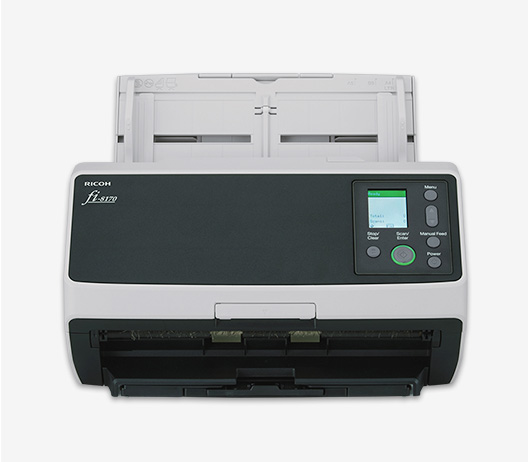
If digitizing paper records is your first step toward secure document management, explore the fi-8170 document scanner to see how it can fit into your workflow.
Note: Information and external links are provided for your convenience and for educational purposes only, and shall not be construed, or relied upon, as legal or financial advice. PFU America, Inc. makes no representations about the contents, features, or specifications on such third-party sites, software, and/or offerings (collectively “Third-Party Offerings”) and shall not be responsible for any loss or damage that may arise from your use of such Third-Party Offerings. Please consult with a licensed professional regarding your specific situation as regulations may be subject to change.